Genie and Skyjack Basics Without Voiding Rental Terms
Summary (TL;DR)
Common scissor lift fault codes on Genie and Skyjack models usually relate to low battery, tilt sensors, or platform overload. Most issues can be resolved by checking ground level, battery charge, and control settings. Rental users should never bypass safety systems or open mechanical components. NAM Rentals provides fast support across Toronto and Ontario to minimize downtime safely.
Introduction
Scissor lifts are reliable machines. But even well maintained units can display fault codes. On busy job sites in Toronto and across Ontario, a simple error code can stop productivity immediately.
Most fault codes are warnings. Some are safety locks. Very few require major mechanical repair.
The key is knowing what you can safely check without violating rental terms. Rental equipment should never be disassembled or modified. But basic inspection and reset procedures are allowed and often expected.
This guide explains common Scissor Lift Fault Codes on Genie and Skyjack machines. It also explains what quick checks you can perform before calling the rental provider.
Why Fault Codes Appear
Modern scissor lifts use onboard diagnostic systems. These systems monitor tilt sensors, battery voltage, platform overload, and drive functions.
When a parameter moves outside safe limits, the machine displays a code and may restrict operation. This is a safety feature. It prevents tip overs and mechanical damage.
Most codes are related to three categories.
Low battery voltage.
Tilt or level sensor activation.
Platform overload or safety switch errors.
Understanding these categories reduces panic on site.
Skyjack lifts often use numeric flash codes or LED indicators.
Skyjack Drive Not Enabled Code
This can appear when platform controls are not fully activated or when safety interlocks are open.
Quick check.
Ensure the emergency stop buttons are pulled out. Check that control selector switches are in the correct position. Confirm guardrails are properly secured.
Often the issue is simple control sequencing.
Skyjack Tilt Light Flashing
Like Genie, Skyjack lifts lock elevation on uneven surfaces.
Quick check.
Reposition to level ground. Confirm the surface is compacted. Inspect for hidden depressions or loose gravel.
Tilt codes almost always clear once stability is restored.
Skyjack Battery or Charging Fault
If the charger is plugged in and the lift will not operate, some models disable drive while charging.
Quick check.
Disconnect the charger completely. Confirm no indicator lights remain active. Restart the machine.
If batteries drain quickly, notify the rental company. Battery health is the provider’s responsibility.
What You Should Never Do on a Rental Lift
Never open hydraulic compartments.
Never bypass limit switches.
Never remove panels to access wiring.
Never override tilt sensors.
Never adjust load calibration.
Rental agreements require that mechanical repairs be performed by authorized technicians.
Basic inspection is acceptable. Mechanical intervention is not.
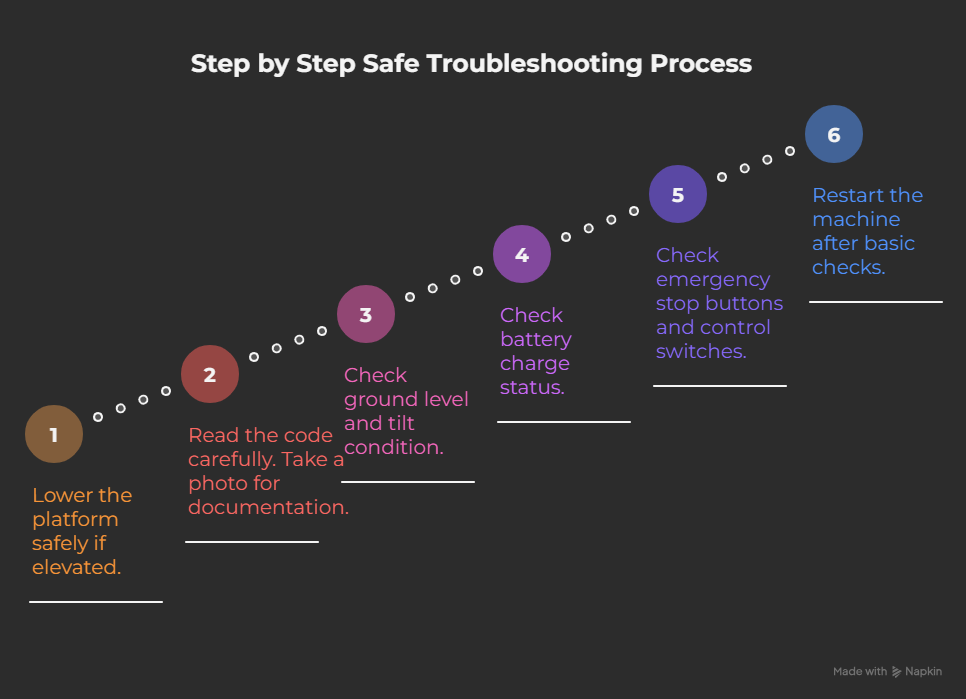
Step by Step Safe Troubleshooting Process
When a fault code appears follow this sequence.
Step one.
Lower the platform safely if elevated.
Step two.
Read the code carefully. Take a photo for documentation.
Step three.
Check ground level and tilt condition.
Step four.
Check battery charge status.
Step five.
Check emergency stop buttons and control switches.
Step six.
Restart the machine after basic checks.
If the code remains, contact your rental provider immediately.
This structured approach reduces downtime while protecting the rental agreement.
GTA Job Site Conditions That Trigger Fault Codes
Downtown Toronto sidewalks are often uneven. Gravel staging areas in Vaughan create tilt sensor activation. Winter conditions in Ontario cause battery voltage drops.
Cold weather reduces battery efficiency. Operators may think the lift is malfunctioning when voltage is simply reduced due to temperature.
Keeping batteries fully charged overnight prevents most winter issues.
Wet construction debris can also affect wheel positioning. Clearing staging zones before operation reduces false tilt codes.
What Should I Check Before Calling the Rental Company?
Before requesting service, perform these basic operator checks. Many scissor lift fault codes are triggered by simple issues that can be resolved safely without repairs.
1. Check the Battery Charge
Low battery voltage is one of the most common causes of warning codes, slow operation, and drive issues on electric scissor lifts. If the battery indicator is low, fully recharge the batteries before operating the machine again.
2. Verify the Emergency Stop Buttons
Ensure that both the ground control and platform emergency stop buttons are fully released. An engaged emergency stop will prevent the lift from driving or elevating.
3. Confirm the Machine Is on Level Ground
Most Genie and Skyjack scissor lifts have tilt sensors that automatically disable lifting when the machine is on excessive slopes. Move the lift to a firm, level surface and see if the warning clears.
4. Check the Platform Load
Make sure the combined weight of workers, tools, and materials does not exceed the lift’s rated capacity. An overloaded platform will trigger safety alarms and may disable lift functions.
5. Inspect for Visible Damage or Hydraulic Leaks
Walk around the machine and look for damaged guardrails, loose wiring, leaking hydraulic fluid, or damaged tires. Do not operate the lift if you notice any visible safety issues.
6. Restart the Machine
Turn the scissor lift off, wait 30 seconds, and restart it. Some temporary communication or sensor faults may clear after a proper restart. If the same fault code appears again, further inspection is required.
7. Record the Fault Code
Write down the exact fault code displayed on the control panel. This information helps your rental provider diagnose the issue quickly and dispatch the appropriate technician if service is needed.
8. Contact Your Rental Provider if the Fault Persists
If the warning remains after completing the checks above, stop using the equipment and contact your rental company. Never bypass safety systems, reset critical fault codes repeatedly, or attempt repairs unless you are authorized and qualified to do so.
When to Call NAM Rentals Immediately
Call your rental provider if:
The lift will not lower.
Hydraulic leaks are visible.
Drive motors fail completely.
Repeated codes appear after reset.
Safety alarms continue after leveling.
Prompt reporting protects both the contractor and the rental provider.
How NAM Rentals Minimizes Equipment Downtime
NAM Rentals inspects scissor lifts before delivery. Batteries are tested. Safety systems are verified. Diagnostic systems are checked.
If a fault occurs during your rental period, our support team responds quickly. We guide basic safe troubleshooting over the phone. If needed we dispatch a technician or replacement unit.
Our goal is minimal downtime without compromising safety.
We understand GTA site pressures. Fast support matters.
Preventing Fault Codes Before They Happen
Charge electric lifts fully each night.
Operate only on level compacted surfaces.
Respect platform load limits.
Keep wheels clear of debris.
Store equipment in dry areas when possible.
Preventative care reduces operational interruptions.
FAQs
What is the most common scissor lift fault code Low battery voltage is the most common issue on electric lifts.
Why will my scissor lift not raise on uneven ground Tilt sensors prevent elevation when the unit is not level.
Can I reset a fault code myself Basic restart procedures are acceptable. Mechanical repairs are not.
Does cold weather cause fault codes Yes. Cold temperatures reduce battery efficiency.
Can I open panels to inspect wiring No. This may void rental terms.
Why does my Skyjack show flashing lights Flashing codes usually indicate tilt or control interlock issues.
Should I keep charging the lift overnight Yes. Full charging prevents voltage related shutdowns.
When should I call the rental company Call if codes persist after basic safe checks.
Can overload warnings damage the lift They are safety protections and prevent unsafe operation.
Does NAM Rentals provide replacement units Yes. We provide service support and equipment swaps when required.
Can I continue operating a scissor lift after a fault code appears?
It depends on the fault code. Some warnings, such as low battery alerts, may allow limited operation, while safety-related codes like tilt sensor activation, overload warnings, or communication faults can disable lift functions. Never ignore or bypass safety-related fault codes. If the issue persists after basic checks, contact your rental provider.
What causes a Genie scissor lift to stop driving?
A Genie scissor lift may stop driving because of low battery voltage, an active emergency stop button, a platform overload, a communication fault, or an engaged tilt sensor. Start by checking the battery charge, emergency stop switches, platform load, and whether the machine is parked on level ground before requesting service.
Why is my Skyjack scissor lift beeping continuously?
Continuous beeping usually indicates a safety warning such as excessive platform load, uneven ground, a tilt condition, or another active fault code. The alarm is designed to protect the operator and should never be ignored. Review the displayed code and perform only the manufacturer-approved operator checks.
Do fault codes vary between Genie and Skyjack models?
Yes. Genie and Skyjack use different onboard diagnostic systems and fault code formats. Although many warnings relate to similar issues—such as battery voltage, tilt sensors, and overload conditions—the actual code numbers and troubleshooting procedures differ by manufacturer and model.
How do I find the meaning of my scissor lift fault code?
Locate the fault code on the machine’s display or control panel, record it, and consult the operator’s manual or contact your rental provider. Different models use different code systems, so the same number may have different meanings on different machines.
Can low battery voltage trigger multiple fault codes?
Yes. A weak battery can cause communication errors, slow hydraulic performance, drive restrictions, and multiple warning messages. Charging the batteries fully is often the first troubleshooting step for electric scissor lifts.
Can rain or cold weather cause scissor lift fault codes?
Yes. Cold temperatures reduce battery efficiency, while excessive moisture can affect sensors and electrical connections. Always operate equipment according to the manufacturer’s environmental guidelines and store electric scissor lifts in appropriate conditions whenever possible.
How often should a rental scissor lift be inspected?
Operators should complete a pre-use inspection before every shift. Rental companies perform scheduled maintenance and safety inspections, but the operator is still responsible for checking batteries, controls, tires, emergency stops, guardrails, and visible damage before use
Will resetting a fault code fix the problem?
No. Resetting a fault code only clears the warning if the underlying issue has been resolved. If the root cause remains, the code will usually reappear immediately or during operation.
When should I stop using the scissor lift immediately?
Stop operating the machine immediately if you notice hydraulic leaks, repeated fault codes after restarting, structural damage, uncontrolled movement, unusual noises, or if the platform cannot lower safely. Contact your rental provider before using the equipment again.
Conclusion
Fault codes are not always mechanical failures. They are usually safety protections doing their job. Knowing the difference between basic inspection and unauthorized repair protects your crew and your rental agreement.
When working across Toronto and Ontario job sites, reliable support makes the difference. NAM Rentals stands behind every scissor lift rental with responsive service and practical guidance.

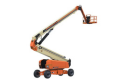


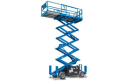
 Scissor Lifts
  Forklifts / Telehandlers
  Compact Equipment
  Heavy Earthmoving
  Others